
Introduction
In today’s digital landscape, cyber threats are becoming increasingly sophisticated. Organisations invest heavily in cybersecurity to protect their networks, applications, and sensitive data from attackers. Two terms that are often used interchangeably in cybersecurity are Ethical Hacking and Penetration Testing (Pentesting). While both involve identifying security weaknesses before malicious hackers can exploit them, they serve different purposes and follow different approaches.
Understanding the distinction between Ethical Hacking and Penetration Testing is essential for businesses, IT professionals, cybersecurity enthusiasts, and students planning a career in information security.
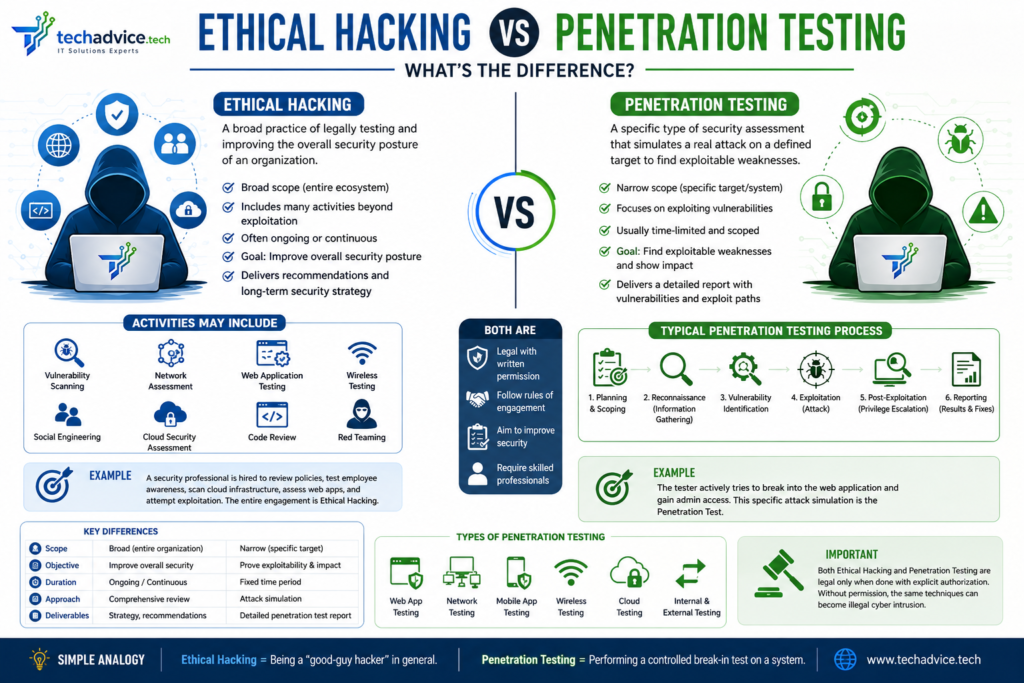
What is Ethical Hacking?
Ethical Hacking is the practice of legally testing computer systems, networks, applications, and digital assets to identify security vulnerabilities. Ethical hackers use the same tools, techniques, and methodologies as malicious hackers, but they do so with proper authorisation and the goal of improving security.
Ethical hackers are often referred to as White Hat Hackers because they work to protect organisations rather than harm them.
Objectives of Ethical Hacking
- Identify security weaknesses across the organisation.
- Assess the effectiveness of existing security controls.
- Evaluate employee security awareness.
- Prevent cyberattacks before they occur.
- Improve the overall security posture of the organisation.
Areas Covered in Ethical Hacking
Ethical hacking may include:
- Network Security Assessment
- Web Application Security Testing
- Wireless Security Testing
- Cloud Security Assessment
- Mobile Application Security Testing
- Social Engineering Testing
- Physical Security Assessment
- Source Code Review
- Vulnerability Assessment
Example
An organisation hires an ethical hacker to evaluate its entire IT infrastructure, including:
- Corporate network
- Web applications
- Employee awareness
- Cloud resources
- Email security
The ethical hacker examines multiple attack vectors and provides recommendations for strengthening security.
What is Penetration Testing?
Penetration Testing, commonly known as Pentesting, is a controlled cybersecurity exercise in which security professionals simulate real-world attacks against a specific target to determine whether vulnerabilities can be exploited.
A penetration test focuses on validating security weaknesses and demonstrating their real-world impact.
Objectives of Penetration Testing
- Identify exploitable vulnerabilities.
- Determine the potential impact of successful attacks.
- Validate security controls.
- Assess business risks.
- Meet regulatory and compliance requirements.
Typical Penetration Testing Process
1. Planning and Scoping
- Define objectives.
- Identify systems to test.
- Establish rules of engagement.
2. Reconnaissance
Gather information about the target:
- Domain information
- IP addresses
- Employee information
- Technology stack
3. Vulnerability Identification
Use automated and manual techniques to discover weaknesses.
4. Exploitation
Attempt to exploit vulnerabilities to gain access.
5. Post-Exploitation
Determine how far an attacker could move within the environment.
6. Reporting
Provide a detailed report including:
- Findings
- Risk ratings
- Proof of concept
- Remediation recommendations
Ethical Hacking vs Penetration Testing: Detailed Comparison
| Feature | Ethical Hacking | Penetration Testing |
| Scope | Broad | Narrow and specific |
| Objective | Improve overall security | Test exploitability of vulnerabilities |
| Duration | Ongoing or periodic | Fixed project duration |
| Coverage | Entire security ecosystem | Specific target or application |
| Approach | Comprehensive security review | Simulated cyberattack |
| Deliverables | Security recommendations and assessments | Detailed penetration test report |
| Compliance Requirement | Not always | Frequently required |
| Focus | Prevention and improvement | Validation and exploitation |
| Testing Style | Multiple security domains | Attack simulation |
Key Differences Explained
1. Scope
Ethical hacking evaluates the organization’s overall security posture.
Penetration testing focuses on a particular target such as:
- Web application
- Internal network
- Mobile application
- Cloud environment
2. Objective
Ethical hackers seek to discover and fix vulnerabilities before attackers find them.
Penetration testers attempt to exploit vulnerabilities to demonstrate their real-world impact.
3. Methodology
Ethical hacking may involve:
- Vulnerability scanning
- Security reviews
- Configuration assessments
- Social engineering
- Security awareness testing
Penetration testing primarily focuses on:
- Exploitation
- Privilege escalation
- Lateral movement
- Data access simulation
4. Reporting
Ethical hacking reports usually provide a broad overview of security improvements.
Penetration testing reports include:
- Vulnerability details
- Proof of exploitation
- Screenshots
- Risk ratings
- Remediation guidance
Types of Penetration Testing
Black Box Testing
The tester has no prior knowledge of the target.
Simulates: External attacker
White Box Testing
The tester receives full information about the system.
Simulates: Insider threat assessment
Gray Box Testing
The tester receives limited information.
Simulates: Authenticated user attack scenario
Types of Ethical Hacking
Network Hacking
Testing routers, switches, firewalls, and servers.
Web Application Hacking
Identifying vulnerabilities such as:
- SQL Injection
- Cross-Site Scripting (XSS)
- Authentication flaws
Wireless Hacking
Assessing Wi-Fi security.
Cloud Security Testing
Evaluating cloud environments for security risks.
Social Engineering
Testing human vulnerabilities through:
- Phishing
- Vishing
- Pretexting
Skills Required
Ethical Hacker
- Networking
- Operating Systems
- Cloud Security
- Security Frameworks
- Programming
- Social Engineering Techniques
- Risk Assessment
Penetration Tester
- Exploitation Techniques
- Web Application Security
- Active Directory Security
- Network Security
- Scripting
- Vulnerability Research
- Report Writing
Popular Certifications
Ethical Hacking Certifications
- CEH (Certified Ethical Hacker)
- CompTIA Security+
- CompTIA PenTest+
- Certified Cybersecurity Practitioner
Penetration Testing Certifications
- OSCP
- OSWP
- OSEP
- GPEN
- PNPT
Which One Does Your Organization Need?
Choose Ethical Hacking if:
- You want a broad security assessment.
- You need to improve overall cybersecurity posture.
- You want continuous security improvement.
Choose Penetration Testing if:
- You want to validate security controls.
- You need compliance testing.
- You want to understand the impact of vulnerabilities.
- You need proof that vulnerabilities can be exploited.
Many organizations perform both ethical hacking and penetration testing as part of a mature cybersecurity program.
Real-World Example
Imagine a company launches a new online banking portal.
Ethical Hacker Activities
- Review server configurations.
- Assess cloud security.
- Check employee security awareness.
- Perform vulnerability scans.
- Review authentication controls.
Penetration Tester Activities
- Attempt SQL Injection attacks.
- Bypass authentication mechanisms.
- Escalate privileges.
- Access sensitive customer data.
- Demonstrate business impact.
The ethical hacker examines the overall security ecosystem, while the penetration tester focuses on proving how vulnerabilities could be exploited.
Conclusion
Ethical Hacking and Penetration Testing are both critical components of modern cybersecurity, but they serve different purposes. Ethical hacking is a broad security assessment approach aimed at strengthening an organisation’s defences, while penetration testing is a focused exercise that simulates real-world attacks to validate security weaknesses.
Organisations that combine both practices gain a deeper understanding of their security posture and are better prepared to defend against evolving cyber threats.
For cybersecurity professionals, mastering both ethical hacking and penetration testing provides a strong foundation for building a successful career in offensive security and cyber defence.