
Linux commands are essential for system administrators, DevOps engineers, cybersecurity professionals, cloud engineers, and developers. Here we are presenting the top 100 important Linux commands with short explanations and examples.
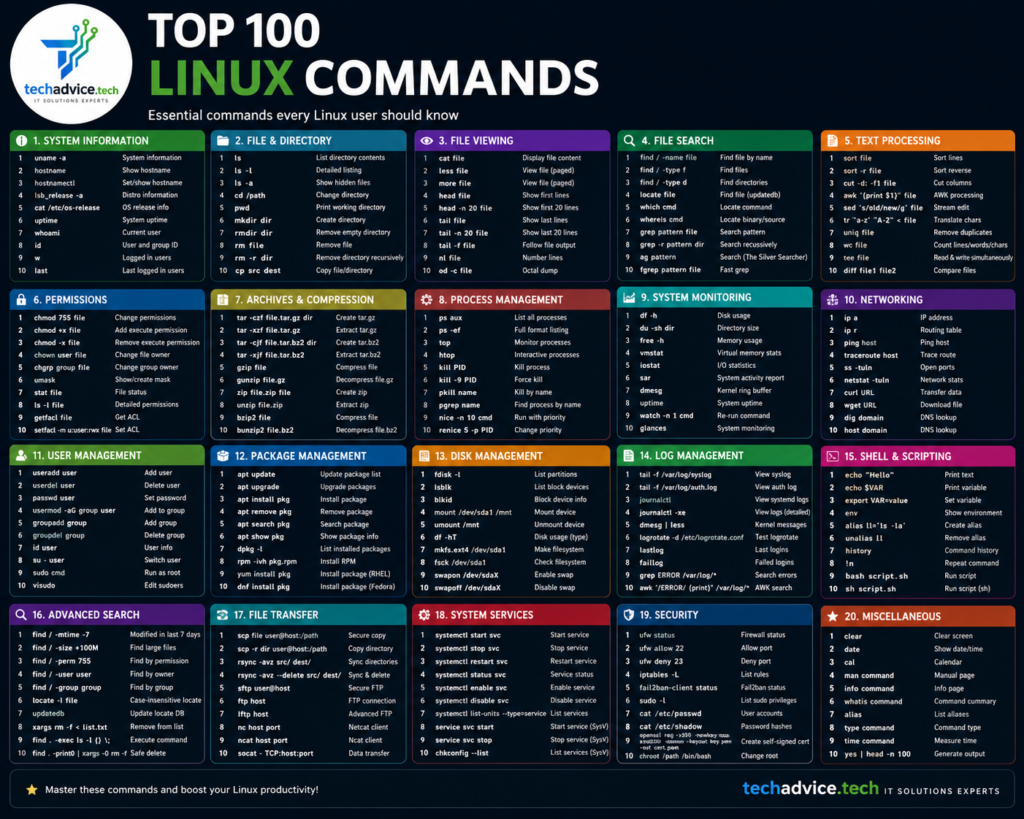
1–10: File & Directory Management
| Command | Explanation |
| pwd | Shows current working directory |
| ls | Lists files and directories |
| cd | Changes directory |
| mkdir | Creates a new directory |
| rmdir | Removes empty directories |
| touch | Creates empty files |
| cp | Copies files/directories |
| mv | Moves or renames files |
| rm | Deletes files/directories |
| tree | Displays directory structure |
Example:
ls -lh
mkdir projects
rm -r oldfolder
11–20: File Viewing & Editing
| Command | Explanation |
| cat | Displays file contents |
| less | View large files page by page |
| more | Basic file viewer |
| head | Shows first lines of file |
| tail | Shows last lines of file |
| nano | Terminal text editor |
| vi / vim | Advanced text editor |
| echo | Prints text/output |
| tee | Writes output to file and screen |
| wc | Counts lines, words, characters |
Example:
tail -f /var/log/syslog
head -10 file.txt
21–30: Searching & Filtering
| Command | Explanation |
| grep | Searches text patterns |
| find | Finds files/directories |
| locate | Quickly locates files |
| which | Shows command location |
| whereis | Finds binary/source/manual |
| sort | Sorts text |
| uniq | Removes duplicate lines |
| cut | Extracts columns |
| awk | Pattern scanning and processing |
| sed | Stream editor for text manipulation |
Example:
grep “failed” auth.log
find /home -name “*.txt”
31–40: Permissions & Ownership
| Command | Explanation |
| chmod | Changes file permissions |
| chown | Changes ownership |
| chgrp | Changes group ownership |
| umask | Sets default permissions |
| passwd | Changes user password |
| su | Switches user |
| sudo | Executes command as root |
| id | Shows user/group IDs |
| groups | Displays user groups |
| whoami | Shows current username |
Example:
chmod 755 script.sh
sudo chown user:user file.txt
41–50: Process Management
| Command | Explanation |
| ps | Displays running processes |
| top | Real-time process monitoring |
| htop | Interactive process viewer |
| kill | Terminates process |
| killall | Kills processes by name |
| pkill | Kills matching process |
| jobs | Lists background jobs |
| bg | Runs process in background |
| fg | Brings process to foreground |
| nice | Starts process with priority |
Example:
ps aux
kill -9 1234
51–60: Disk & Storage Management
| Command | Explanation |
| df | Shows disk space usage |
| du | Shows directory/file size |
| fdisk | Disk partition manager |
| lsblk | Lists block devices |
| mount | Mounts file systems |
| umount | Unmounts file systems |
| mkfs | Creates filesystem |
| fsck | Filesystem check |
| blkid | Displays block device UUID |
| parted | Advanced partition tool |
Example:
df -h
lsblk
61–70: Networking Commands
| Command | Explanation |
| ping | Tests connectivity |
| ifconfig | Network interface config |
| ip | Modern network configuration |
| netstat | Network statistics |
| ss | Socket statistics |
| traceroute | Tracks packet route |
| nslookup | DNS lookup |
| dig | Advanced DNS query |
| curl | Transfers data from URLs |
| wget | Downloads files |
Example:
ping google.com
curl https://example.com
71–80: System Information
| Command | Explanation |
| uname | System information |
| hostname | Displays hostname |
| uptime | System running time |
| date | Displays current date/time |
| cal | Shows calendar |
| free | Memory usage |
| vmstat | Virtual memory stats |
| lscpu | CPU information |
| lsmem | Memory details |
| dmesg | Kernel logs |
Example:
uname -a
free -m
81–90: Compression & Archiving
| Command | Explanation |
| tar | Archive files |
| gzip | Compress files |
| gunzip | Decompress gzip files |
| zip | Creates ZIP archive |
| unzip | Extracts ZIP archive |
| bzip2 | Compresses files |
| xz | High-ratio compression |
| rsync | File synchronization |
| scp | Secure file copy |
| sftp | Secure file transfer |
Example:
tar -cvf backup.tar folder/
tar -xvf backup.tar
91–100: Advanced & Useful Commands
| Command | Explanation |
| history | Shows command history |
| alias | Creates command shortcuts |
| crontab | Schedules tasks |
| systemctl | Controls system services |
| journalctl | Views system logs |
| service | Manages services |
| reboot | Restarts system |
| shutdown | Powers off system |
| env | Displays environment variables |
| xargs | Builds command arguments |
Example:
systemctl status ssh crontab -e