
Introduction
Cybersecurity is no longer limited to large enterprises or government agencies. Today, organisations of every size face constant threats from ransomware, phishing attacks, insider threats, data breaches, and advanced persistent threats (APTs). To effectively defend modern IT environments, cybersecurity professionals must master a variety of security tools that help identify vulnerabilities, monitor networks, detect attacks, and respond to incidents.
Whether you’re an aspiring ethical hacker, SOC analyst, penetration tester, security engineer, or IT administrator, learning the right cybersecurity tools can significantly improve your skills and career opportunities.
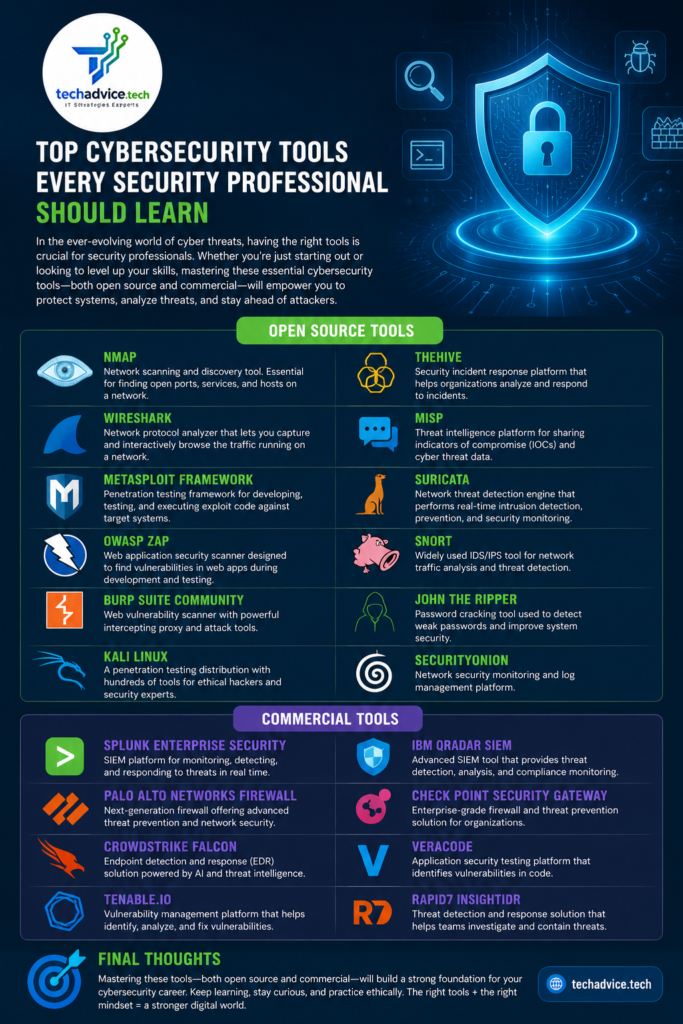
This article explores the most important cybersecurity tools that every security professional should know, including both open-source and commercial solutions.
1. Nmap (Network Mapper)
Category:
Network Discovery & Security Auditing
Type:
Open Source
Overview
Nmap is one of the most widely used cybersecurity tools for discovering hosts and services on a network. It helps security professionals identify open ports, running services, operating systems, and potential attack surfaces.
Key Features
- Host discovery
- Port scanning
- Service detection
- Operating system fingerprinting
- Vulnerability identification through NSE scripts
Common Use Cases
- Network inventory
- Security assessments
- Penetration testing
- Firewall validation
Example Command
nmap -sV -A 192.168.1.1
Why Learn It?
Nmap is considered the foundation of network reconnaissance and is used by both defenders and ethical hackers worldwide.
2. Wireshark
Category:
Network Protocol Analyzer
Type:
Open Source
Overview
Wireshark is the industry-standard packet analysis tool used for capturing and inspecting network traffic in real time.
Key Features
- Deep packet inspection
- Protocol analysis
- Network troubleshooting
- Malware traffic investigation
- VoIP analysis
Common Use Cases
- Network monitoring
- Incident response
- Threat hunting
- Forensics investigations
Why Learn It?
Every cybersecurity professional should understand network communications, and Wireshark provides unmatched visibility into network traffic.
For more details, please visit https://techadvice.tech/wireshark-complete-guide-for-network-analysis/
3. Metasploit Framework
Category:
Penetration Testing
Type:
Open Source (Commercial version available)
Overview
Metasploit is one of the most popular penetration testing frameworks used to identify, validate, and exploit security vulnerabilities.
Key Features
- Exploit development
- Payload generation
- Vulnerability validation
- Post-exploitation modules
Common Use Cases
- Red team operations
- Security assessments
- Ethical hacking
- Vulnerability verification
Why Learn It?
Metasploit simplifies exploit testing and is commonly used in professional penetration testing engagements.
4. Burp Suite
Category:
Web Application Security Testing
Type:
Community (Free) & Professional (Commercial)
Overview
Burp Suite is the most popular web application security testing platform used by security researchers and penetration testers.
Key Features
- Intercepting proxy
- Vulnerability scanner
- Repeater
- Intruder
- Web crawling
Common Use Cases
- Web application penetration testing
- API security testing
- Authentication testing
- Session management analysis
Why Learn It?
Most modern attacks target web applications. Burp Suite is an essential tool for finding web vulnerabilities.
5. OWASP ZAP
Category:
Web Application Security Testing
Type:
Open Source
Overview
OWASP ZAP (Zed Attack Proxy) is a free alternative to Burp Suite designed for discovering web application vulnerabilities.
Key Features
- Automated scanning
- Passive scanning
- Active scanning
- API security testing
Common Use Cases
- DevSecOps integration
- CI/CD security testing
- Web application assessments
Why Learn It?
Organizations seeking cost-effective security testing often adopt OWASP ZAP.
6. Nessus
Category:
Vulnerability Assessment
Type:
Commercial
Overview
Nessus is one of the most widely used vulnerability scanners for identifying security weaknesses in systems, applications, and network devices.
Key Features
- Vulnerability scanning
- Compliance auditing
- Configuration assessment
- Risk prioritization
Common Use Cases
- Internal audits
- Compliance assessments
- Patch management verification
Why Learn It?
Many enterprises rely on Nessus for routine vulnerability management programs.
7. OpenVAS (Greenbone)
Category:
Vulnerability Management
Type:
Open Source
Overview
OpenVAS is a powerful open-source vulnerability scanner that competes with commercial products like Nessus.
Key Features
- Network vulnerability scanning
- Compliance checks
- Detailed reporting
- Continuous updates
Why Learn It?
It provides enterprise-grade vulnerability scanning without licensing costs.
8. Kali Linux
Category:
Security Distribution
Type:
Open Source
Overview
Kali Linux is a specialized Linux distribution designed for cybersecurity professionals.
Includes Tools Such As
- Nmap
- Wireshark
- Metasploit
- Burp Suite
- John the Ripper
- Hydra
- Aircrack-ng
Why Learn It?
Kali Linux serves as the primary operating system for many penetration testers and security researchers.
9. Splunk
Category:
SIEM (Security Information and Event Management)
Type:
Commercial
Overview
Splunk collects, analyzes, and visualizes machine-generated data from servers, applications, firewalls, and security devices.
Key Features
- Log aggregation
- Threat detection
- Dashboard creation
- Real-time monitoring
Common Use Cases
- SOC operations
- Threat hunting
- Security monitoring
Why Learn It?
Splunk skills are highly demanded in Security Operations Centers (SOCs).
10. Wazuh
Category:
SIEM & XDR
Type:
Open Source
Overview
Wazuh provides threat detection, security monitoring, file integrity monitoring, and compliance management.
Key Features
- Host-based intrusion detection
- Log analysis
- Vulnerability detection
- Compliance reporting
Why Learn It?
It is one of the fastest-growing open-source SIEM platforms.
11. Microsoft Defender XDR
Category:
Endpoint Detection and Response
Type:
Commercial
Overview
Microsoft Defender XDR offers integrated protection across endpoints, identities, cloud applications, and email systems.
Key Features
- Threat detection
- Automated investigation
- Incident response
- Advanced hunting
Why Learn It?
Many enterprises use Microsoft security products extensively.
12. CrowdStrike Falcon
Category:
Endpoint Security
Type:
Commercial
Overview
CrowdStrike Falcon is a cloud-native endpoint protection platform that provides advanced threat detection and response capabilities.
Key Features
- EDR
- Threat intelligence
- Incident response
- Behavioral analytics
Why Learn It?
CrowdStrike is widely adopted by large organizations worldwide.
13. Snort
Category:
Intrusion Detection System (IDS)
Type:
Open Source
Overview
Snort analyzes network traffic and identifies malicious activities using signature-based detection.
Key Features
- Real-time traffic analysis
- Intrusion detection
- Packet logging
- Threat prevention
Why Learn It?
Snort remains one of the most trusted IDS platforms in cybersecurity.
14. Suricata
Category:
IDS/IPS
Type:
Open Source
Overview
Suricata is a modern intrusion detection and prevention system capable of high-speed traffic inspection.
Key Features
- Multi-threading
- Protocol identification
- File extraction
- Network security monitoring
Why Learn It?
Suricata performs exceptionally well in enterprise environments.
15. John the Ripper
Category:
Password Security Testing
Type:
Open Source
Overview
John the Ripper is used to test password strength by performing password-cracking operations.
Key Features
- Dictionary attacks
- Brute-force attacks
- Password auditing
Why Learn It?
Understanding weak passwords helps organizations strengthen authentication security.
16. Hashcat
Category:
Password Recovery
Type:
Open Source
Overview
Hashcat is one of the fastest password recovery tools available, utilizing GPU acceleration.
Key Features
- GPU-based cracking
- Multiple hash support
- High performance
Why Learn It?
Hashcat is widely used in penetration testing and security research.
17. Aircrack-ng
Category:
Wireless Security Testing
Type:
Open Source
Overview
Aircrack-ng is a suite of tools for assessing Wi-Fi security.
Key Features
- Wireless packet capture
- WPA/WPA2 auditing
- Wireless reconnaissance
Why Learn It?
Wireless security remains a critical area of cybersecurity.
18. Autopsy
Category:
Digital Forensics
Type:
Open Source
Overview
Autopsy is a digital forensic platform used to investigate security incidents and collect evidence.
Key Features
- Disk analysis
- File recovery
- Timeline investigation
- Artifact extraction
Why Learn It?
Forensic skills are valuable for incident response professionals.
Recommended Learning Path
Beginner
- Kali Linux
- Nmap
- Wireshark
- OWASP ZAP
- Wazuh
Intermediate
- Burp Suite
- Nessus
- OpenVAS
- Snort
- Suricata
Advanced
- Metasploit
- Splunk
- CrowdStrike Falcon
- Microsoft Defender XDR
- Digital Forensics Tools
Final Thoughts
Cybersecurity is a rapidly evolving field that requires continuous learning. No single tool can secure an entire environment. Security professionals must develop expertise across multiple domains, including network security, vulnerability management, penetration testing, threat detection, digital forensics, and incident response.
For beginners, start with open-source tools such as Nmap, Wireshark, Kali Linux, OWASP ZAP, and Wazuh. As your skills mature, expand into enterprise solutions like Splunk, CrowdStrike Falcon, Microsoft Defender XDR, and Nessus.
The more hands-on experience you gain with these tools, the more effective you will become at protecting systems, identifying vulnerabilities, and responding to modern cyber threats.
For a deeper understanding of Nmap, you may also explore our detailed blog articles covering its features, scanning techniques, and practical use cases. https://techadvice.tech/network-scanning-security-auditing-guide/